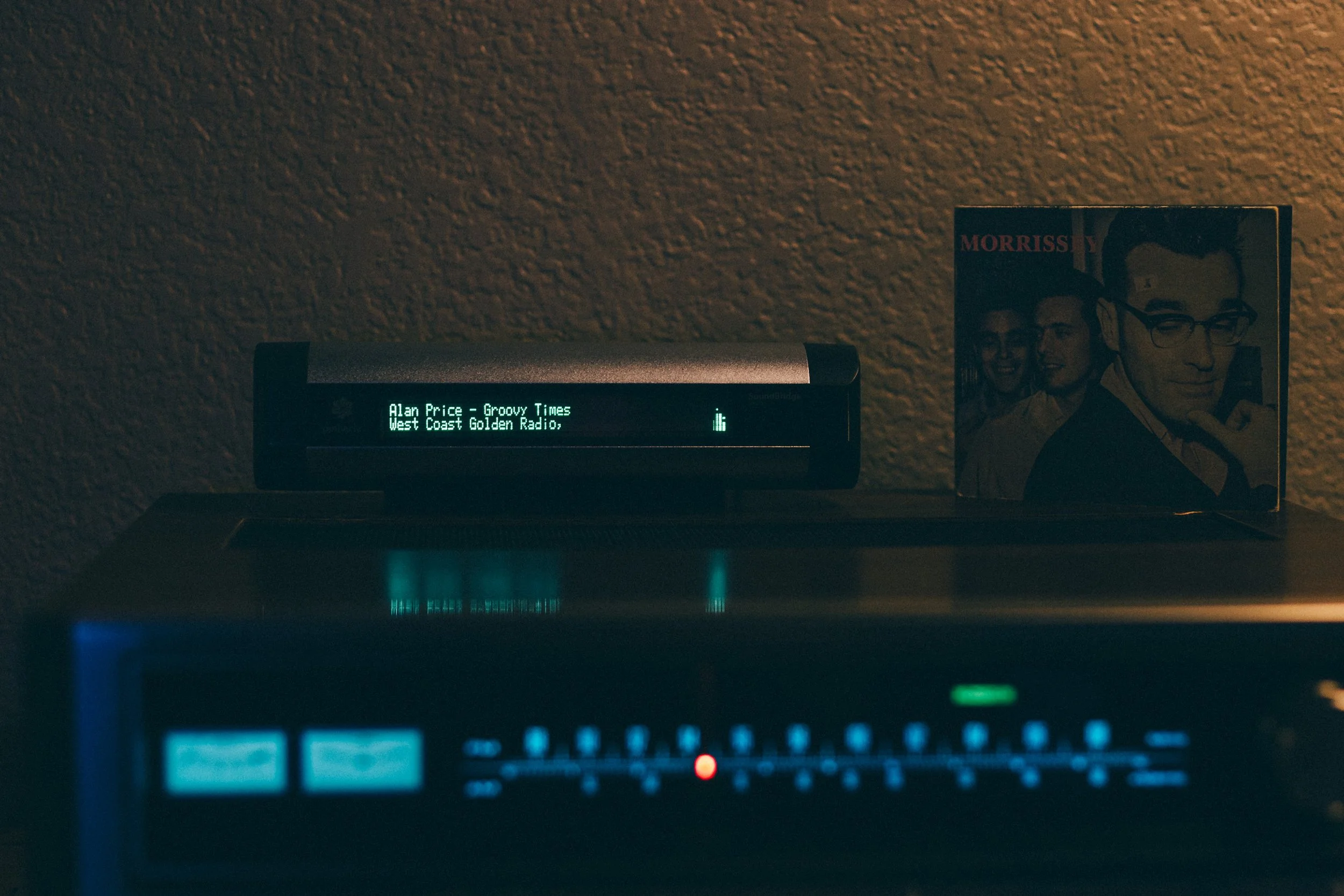
Soundbridge M500

Roku SoundBridge – Making the SoundBridge Wizard smarter by Andrew B. Powers

roku pinnacle soundbridge m1001_pioneer sx636 receiver powerssowi soundbridge wizard

Why stream intelligence was needed.

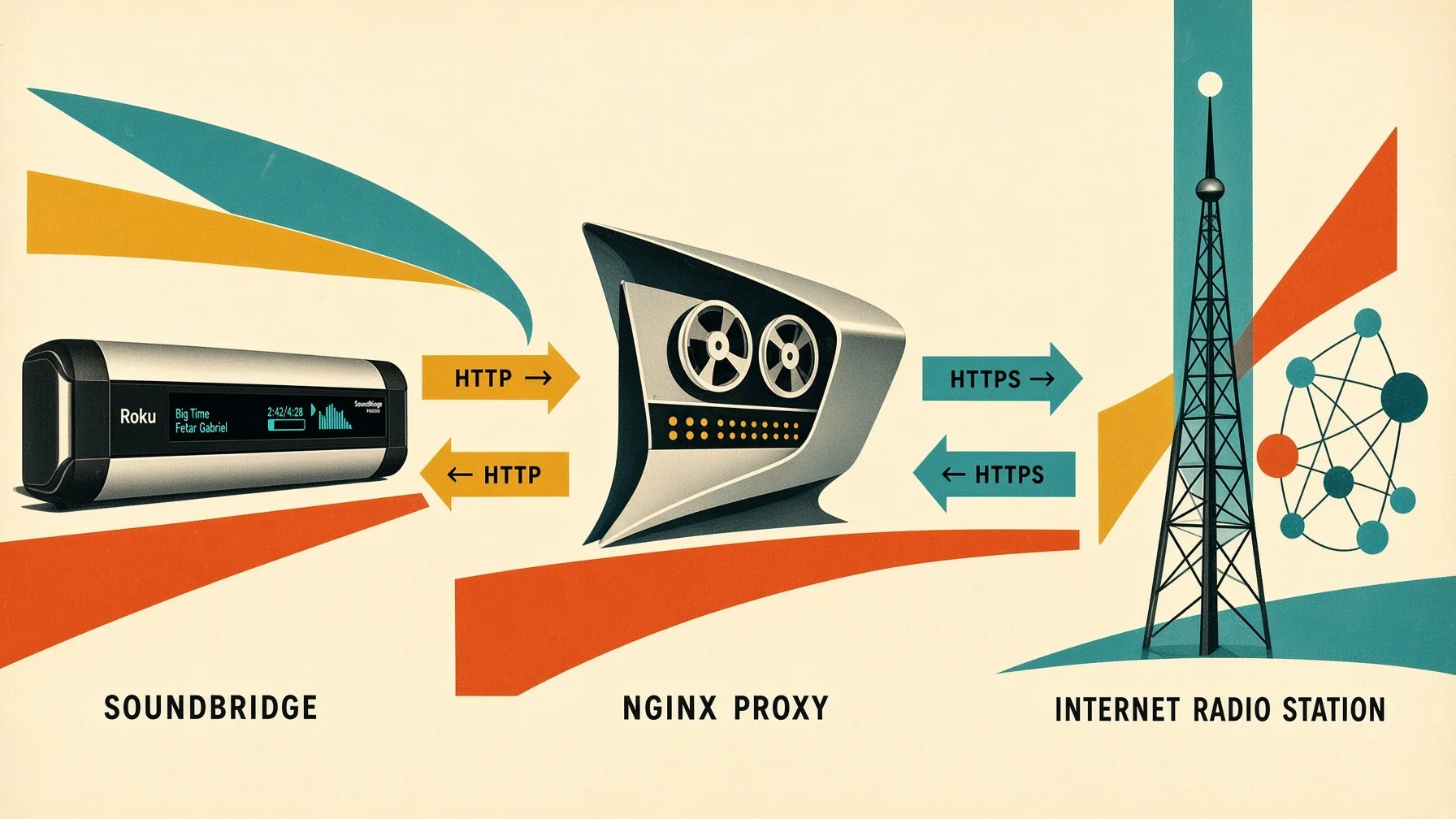
The first NGINX solution had one decisive advantage: it was simple. The SoundBridge received a local HTTP endpoint, while NGINX handled the HTTPS connection to the actual stream in the background. For many streams, this approach worked extremely well.

Over time, however, it became clear that a pure HTTPS-to-HTTP proxy had its limitations. An audio stream is not just audio data. Internet radio streams often carry additional information such as station name, genre, bitrate, and the currently playing track through ICY metadata. Streaming servers also do not all behave the same way: some URLs are simply redirects, some only deliver the actual stream after several HTTP steps, while others use different headers or stream formats.

This is where the second version of the POWERSSBWIZ - SOUNDBRIDGE WIZARD ESSENTIAL came in. Instead of simply passing the connection between the SoundBridge and the radio station through, the SOUNDBRIDGE WIZARD could analyze the stream itself and, when necessary, prepare it specifically for the SoundBridge.

From a simple proxy to a stream-aware relay.

The new version was therefore no longer implemented purely as an NGINX configuration, but as its own small streaming service. The application runs in a Docker container and is based on Python 3.12. In addition, FFmpeg and the required CA certificates are installed inside the container.

This allows the POWERSSBWIZ - SOUNDBRIDGE WIZARD ESSENTIAL to use different approaches depending on the source.

First, the requested stream URL is analyzed and the SOUNDBRIDGE WIZARD attempts to open the stream directly as an ICY stream.

That is an important difference from the original NGINX solution.

ICY metadata.

A traditional Internet radio stream can transmit additional ICY information alongside the actual audio data. The POWERSSBWIZ - SOUNDBRIDGE WIZARD ESSENTIAL explicitly requests this information using the header

Icy-MetaData: 1

During the connection, it can process information such as the station name, genre, bitrate, and the interval at which metadata is transmitted.

The most important piece of information, however, is the actual track title.

ICY metadata can contain a value such as StreamTitle. The SOUNDBRIDGE WIZARD ESSENTIAL can extract this metadata from the live stream and use it to determine the currently playing track. The corresponding function parses the ICY metadata and extracts the individual keys and values.

The SOUNDBRIDGE WIZARD can then package the detected title back into ICY metadata. It creates a corresponding StreamTitle field and sends it to the client as ICY metadata.

The result is more than just a working audio stream: the relevant radio metadata can remain available to the SoundBridge as well.

Keeping the SoundBridge informed.

The POWERSSBWIZ - SOUNDBRIDGE WIZARD ESSENTIAL provides several built-in endpoints that make the current streaming state available without requiring direct access to the container.

The main web interface is available at:

http://<PUBLIC_HOST>:8731/

With the configuration used for this project, for example:

http://192.168.1.1:8731/

The detailed user interface itself is described later in the Web Interface section. For stream monitoring and diagnostics, the SOUNDBRIDGE WIZARD also provides dedicated status endpoints.

The JSON status API is available at:

/api/status

For example:

http://192.168.1.1:8731/api/status

Depending on the current playback state, the API provides information such as:

  • status

  • mode

  • source

  • resolved_source

  • station

  • genre

  • bitrate

  • now_playing

This makes it possible to inspect the current stream state programmatically or directly from a browser.

For a basic service check, the SOUNDBRIDGE WIZARD ESSENTIAL also provides a health endpoint:

/health

For example:

http://192.168.1.1:8731/health

The health endpoint provides a simple indication that the service is running and also reports basic information about the current SOUNDBRIDGE WIZARD installation.

These endpoints are also reported by the SOUNDBRIDGE WIZARD ESSENTIAL when the service starts.

No ICY - no problem!

Of course, not every stream provides the expected ICY metadata structure. The POWERSSBWIZ - SOUNDBRIDGE WIZARD ESSENTIAL therefore does not rely exclusively on ICY.

When the source stream cannot be processed directly this way, FFmpeg provides an alternative processing path.

FFmpeg opens the source stream and converts the audio into a standardized MP3 stream for the SoundBridge.

The SOUNDBRIDGE WIZARD also uses automatic reconnect options. If the connection to the source server drops or reaches the end of the stream, FFmpeg can attempt to reconnect. Among other options, the SOUNDBRIDGE WIZARD uses -reconnect, -reconnect_streamed, -reconnect_at_eof, and a maximum reconnect delay.

This makes the second solution considerably more flexible than a pure HTTP/HTTPS proxy. The source no longer has to provide audio in exactly the format the SoundBridge can handle directly. The POWERSSBWIZ - SOUNDBRIDGE WIZARD ESSENTIAL can process the stream through FFmpeg first and then output it in a format suitable for the SoundBridge.

A common output for the SoundBridge.

In FFmpeg mode, the audio is output as MP3 at 128 kbps, 44.1 kHz, stereo.

This effectively shields the SoundBridge from many of the details and inconsistencies of modern streaming servers.

For the SoundBridge, the connection remains simple:

SoundBridge → HTTP → SoundBridge Wizard → Internet stream

Behind the scenes, however, the POWERSSBWIZ - SOUNDBRIDGE WIZARD ESSENTIAL can work considerably harder:

SoundBridge → HTTP → SoundBridge Wizard → HTTPS / ICY / FFmpeg → Internet Radio

That additional processing capability is what sets the new solution apart from the original version.

The stream endpoint.

The actual stream is provided through a dedicated HTTP endpoint:

/powerssbwiz/<stream-url>

This endpoint is also displayed when the POWERSSBWIZ - SOUNDBRIDGE WIZARD ESSENTIAL starts.

The SOUNDBRIDGE WIZARD accepts both http:// and https:// source URLs. The supplied URL is extracted from the request and then processed by the SOUNDBRIDGE WIZARD ESSENTIAL.

This allows the SoundBridge to connect to a simple local HTTP stream while the SOUNDBRIDGE WIZARD handles the connection to the actual Internet stream in the background and, depending on the source and processing path, prepares the audio accordingly.

The SOUNDBRIDGE WIZARD ESSENTIAL therefore acts as an intermediary between legacy streaming hardware and today's streaming servers.

Docker container.

The technical implementation is fully containerized and designed for a straightforward private installation.

The application runs as a small Docker stack consisting of two containers.
The SOUNDBRIDGE WIZARD ESSENTIAL itself:

  • powerssbwiz_soundbridge_wizard_essential

The local PostgreSQL database

  • powerssbwiz_soundbridge_wizard_essential_postgres

The SOUNDBRIDGE WIZARD ESSENTIAL image is based on python:3.12-slim. FFmpeg, CA certificates, and the required Python dependencies are installed inside the container. The host system therefore does not need a separate Python environment, FFmpeg installation, or PostgreSQL setup.

Configuration is handled through a .env file. It defines the main parameters for the installation and network environment, including:

CONTAINER_NAME – the Docker container name
POSTGRES_CONTAINER_NAME – the PostgreSQL container name
HTTP_PORT – the HTTP port used by the SOUNDBRIDGE WIZARD ESSENTIAL
TZ – the time zone
PUBLIC_HOST – the host's IP address or hostname
DNS_PRIMARY – the primary DNS server
DNS_SECONDARY – the secondary DNS server
LOCAL_DB_DATA_PATH – the persistent PostgreSQL data directory
BACKUP_HOST_PATH – the directory used for local backups
BACKUP_INTERVAL_HOURS – the automatic backup interval
BACKUP_MAX_VERSIONS – the maximum number of stored automatic backups
ACTIVITY_LOG_RETENTION_DAYS – the default number of days System Log entries are retained

In the SOUNDBRIDGE WIZARD ESSENTIAL edition, the default HTTP port is 8731. The SOUNDBRIDGE WIZARD also listens internally on port 8731, so the Docker port mapping is deliberately kept simple: 8731 → 8731

With the default configuration, the web interface and SoundBridge relay are therefore available on port 8731 of the Docker host.

The PostgreSQL container stores the persistent application data independently from the SOUNDBRIDGE WIZARD ESSENTIAL container. Database files can be placed in a dedicated host directory, while backups can be written to a separate backup directory.

For example, a typical installation can use

/home/powerssbwizessential/database/postgres

for PostgreSQL data and

/home/powerssbwizessential/backup

for backups.

Backup management is integrated directly into the SOUNDBRIDGE WIZARD's web interface. Automatic backups can be enabled or disabled by setting an interval, the number of retained backup versions can be configured, and backups can also be created manually.

The interface shows the configured backup location, whether automatic backups are enabled, how many backups are currently stored, the time of the last successful backup, the next scheduled backup, and any backup error reported by the system.

Existing backups can be downloaded, verified, restored, or deleted directly from the web interface. A backup ZIP file can also be restored manually from the local computer.

The local PostgreSQL database is also used for the persistent System Log. Log entries therefore survive container restarts and remain independent of the application container itself. The default retention period can be defined through the .env file and later changed directly from the web interface.

The System Log and its retention setting are included in the normal POWERSSBWIZ backup data. Restoring a backup therefore also restores the corresponding log entries and log-retention configuration.

This containerized architecture keeps the SOUNDBRIDGE WIZARD ESSENTIAL largely independent of the underlying host operating system. Python, FFmpeg, the application itself, and PostgreSQL all run inside Docker, while persistent configuration, database files, backups, and log data remain clearly separated from the application container.

For administration, you can use Portainer, although it is not required. The complete installation can also be managed entirely from the command line with Docker and Docker Compose.

On a home server, Portainer is particularly convenient because both containers can be started, stopped, recreated, inspected, and monitored through a graphical interface. At the same time, the actual installation remains reproducible because the configuration is defined through docker-compose.yml and the .env file rather than being tied to Portainer itself.

Web Interface.

The web interface of SOUNDBRIDGE WIZARD ESSENTIAL is intentionally kept simple and focused on the functions needed for a private SoundBridge installation.
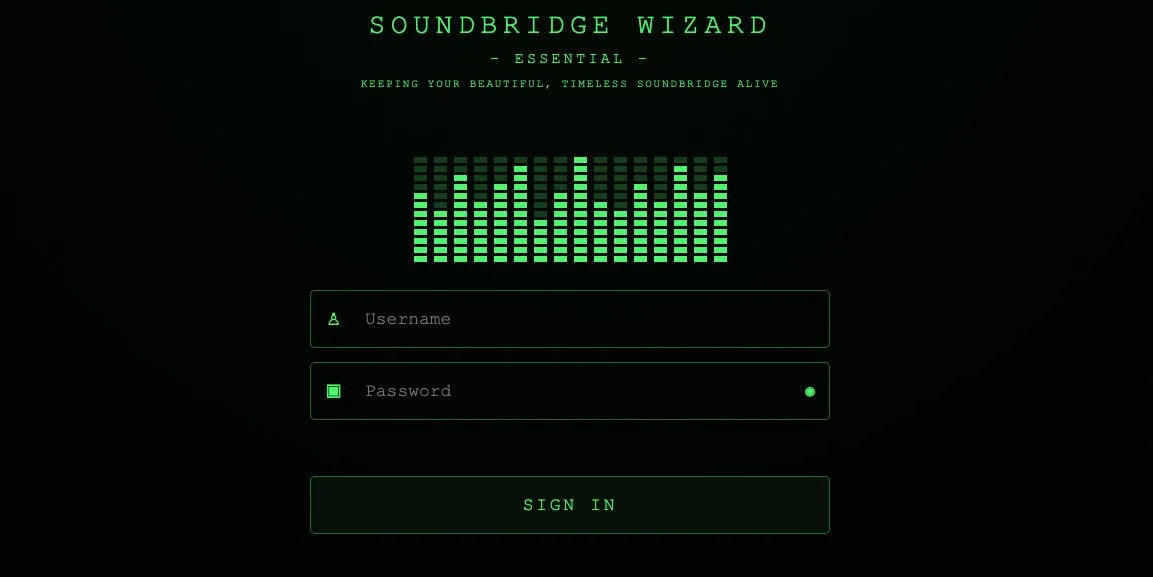
POWERSSBWIZ - SOUNDBRIDGE WIZARD ESSENTIAL - Login

After signing in, the main areas of the SOUNDBRIDGE WIZARD are available through a compact navigation menu.

DASHBOARD

The Dashboard provides an immediate overview of the current system state. It shows the SoundBridges that are currently active and receiving a stream through the SOUNDBRIDGE WIZARD.

Under ACTIVE SOUNDBRIDGES, each active device can be inspected in more detail. Clicking a device expands its current stream information, including the MAC address, playback detection method, operating mode, input and output format, ICY metadata status, station name, and the currently playing title.
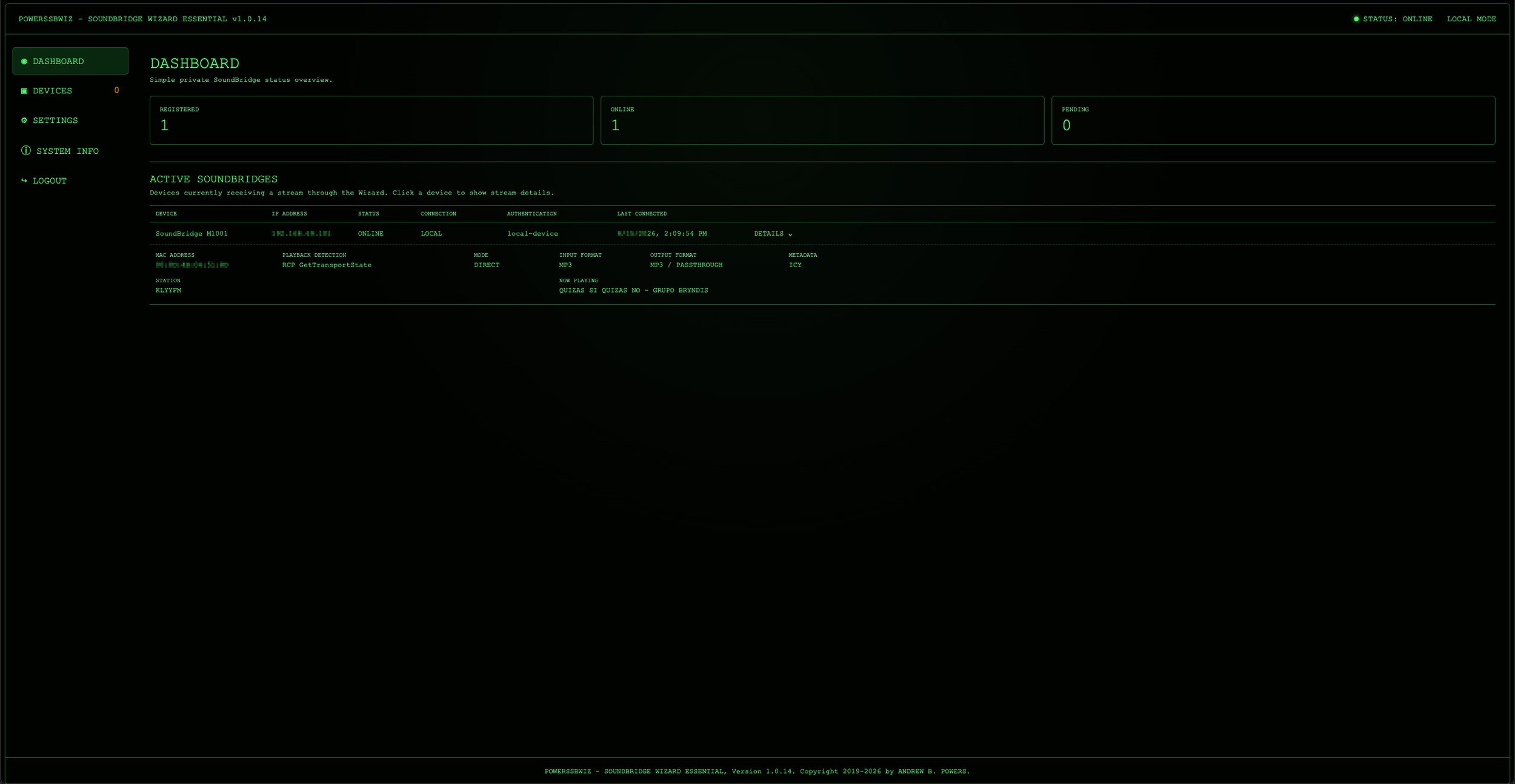
POWERSSBWIZ - SOUNDBRIDGE WIZARD ESSENTIAL - Dashboard

DEVICES

This section is used to manage SoundBridges known to the SOUNDBRIDGE WIZARD. It includes the REGISTERED DEVICES list, where authorized SoundBridges can be viewed and managed. Device names can be changed directly from this section, making it easier to identify individual players when several SoundBridges are used in the same network.
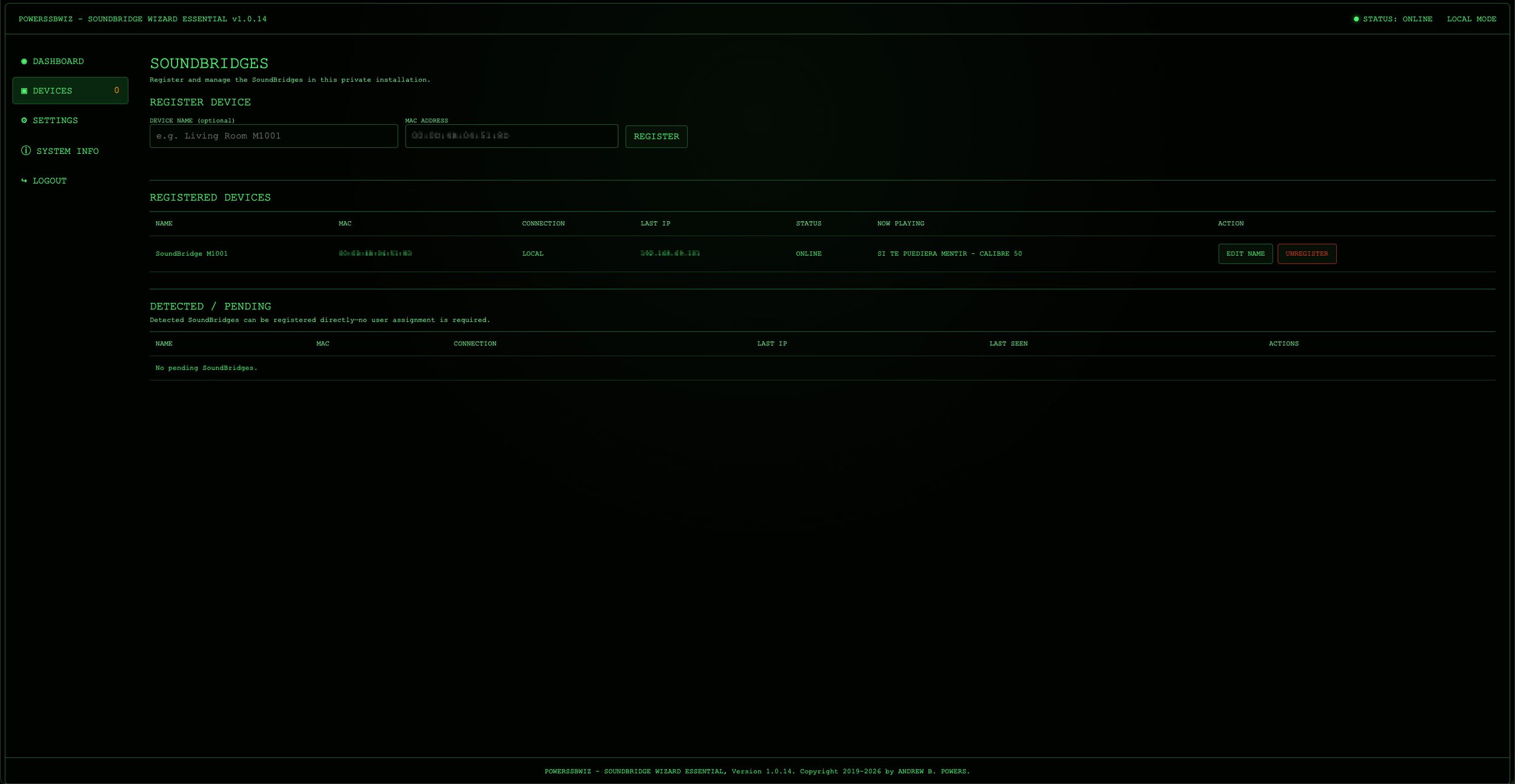
POWERSSBWIZ - SOUNDBRIDGE WIZARD ESSENTIAL - Devices

SETTINGS

This section contains the main configuration options for the local installation. It also includes the integrated backup and restore functions. Automatic backup intervals and the number of retained backup versions can be configured from the browser, while backups can also be created manually.

The backup area shows the configured backup location, whether automatic backups are enabled, the number of stored backups, the last successful backup, the next scheduled backup, and any reported backup error. Existing backup files can be downloaded, verified, restored, or deleted directly from the interface. An external backup ZIP file can also be selected and restored manually.
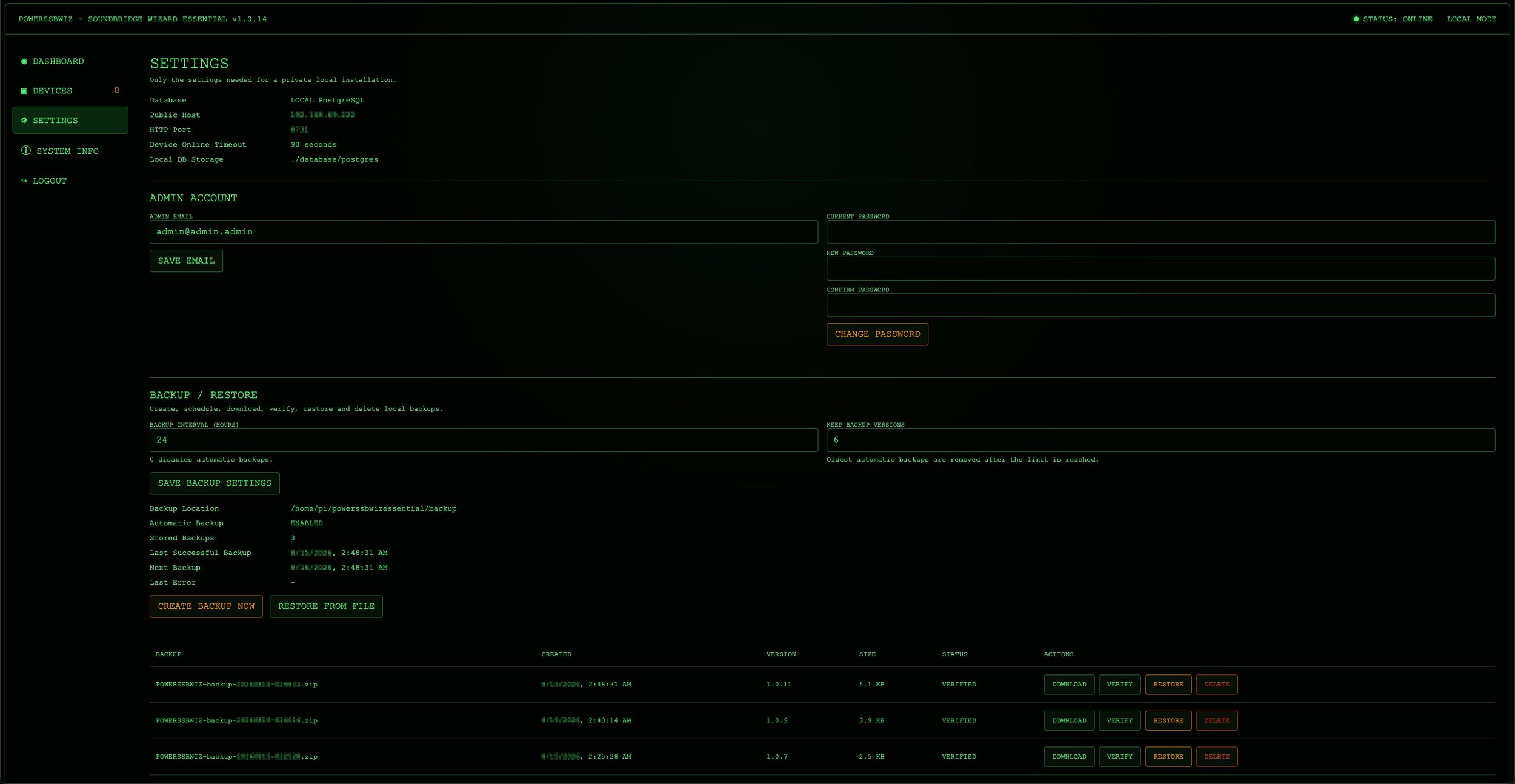
POWERSSBWIZ - SOUNDBRIDGE WIZARD ESSENTIAL - Settings

SYSTEM INFO

This section provides information about the running OWERSSBWIZ - SOUNDBRIDGE WIZARD ESSENTIAL installation and its environment, allowing important system details to be checked directly from the browser without opening a terminal.

It also contains the integrated SYSTEM LOG, which provides a simple view of recent SOUNDBRIDGE WIZARD runtime events. The log retention period can be configured directly from the web interface, and the complete log can be cleared manually when required.

Because the SYSTEM LOG is stored persistently in PostgreSQL, both the log entries and the configured retention setting are included in the normal SOUNDBRIDGE WIZARD backup. Restoring a backup therefore also restores the corresponding SYSTEM LOG and its retention configuration.
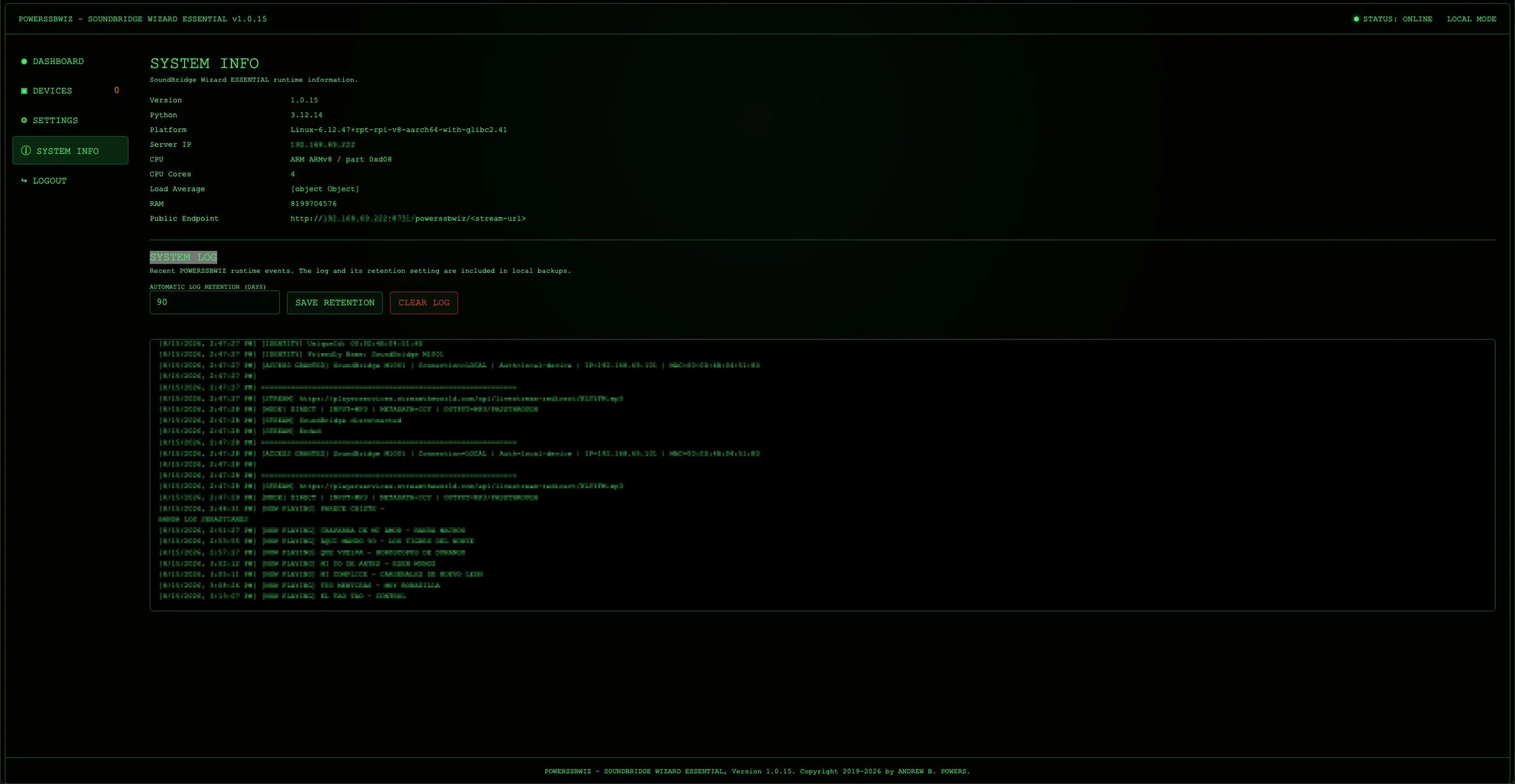
POWERSSBWIZ - SOUNDBRIDGE WIZARD ESSENTIAL - System Info

The SOUNDBRIDGE WIZARD ESSENTIAL interface is deliberately limited to the functions that are useful for operating a SoundBridge installation at home. Instead of exposing unnecessary administrative complexity, it brings device management, stream monitoring, configuration, backups, system logging, and system information together in one clear web interface.

soundbridge m1001 m1000 m2000 audio cabinet beastie_boy books vintage receiver mid century house palm springs powerssowi soundbridge wizard

Conclusion.

The project has evolved considerably from the original NGINX solution.
The first version primarily solved one specific problem:

HTTPS on the modern side, HTTP on the SoundBridge side.

The SOUNDBRIDGE WIZARD goes much further. It can analyze the stream itself, process ICY metadata, handle station information and StreamTitle, follow different stream behaviors, and use FFmpeg as an alternative processing path whenever direct relaying is not sufficient.

At the same time, the project has grown beyond the streaming relay itself. SoundBridge devices can be detected and registered, active playback can be monitored, detailed information about the current connection and stream is available directly through the integrated web interface, and important runtime events can be reviewed through the persistent System Log.

Configuration, device management, stream monitoring, system information, system logging, and backup and restore functions are all accessible from the browser, while the complete application runs as a self-contained Docker installation with a local PostgreSQL database.

What started as a simple HTTPS-to-HTTP workaround has therefore become a dedicated compatibility layer between modern Internet radio infrastructure and a network music player from another era.

And that was ultimately the goal: the SoundBridge should not have to know how the Internet has changed over the past twenty years. It should simply continue doing what it was built to do - playing music.

The POWERSSBWIZ - SOUNDBRIDGE WIZARD ESSENTIAL takes care of the rest!

Check out this SoundBridge blog post too

Do you have any recommendations or personal guidelines that you find helpful?

Please feel free to comment and share your thoughts on “Roku SoundBridge – Making the SoundBridge Wizard smarter”.


If you like my work or the free stuff and want to say thank you, please use this opportunity now and

THANK YOU, very much! 🙏🏻

If you have any questions, please drop me a message!
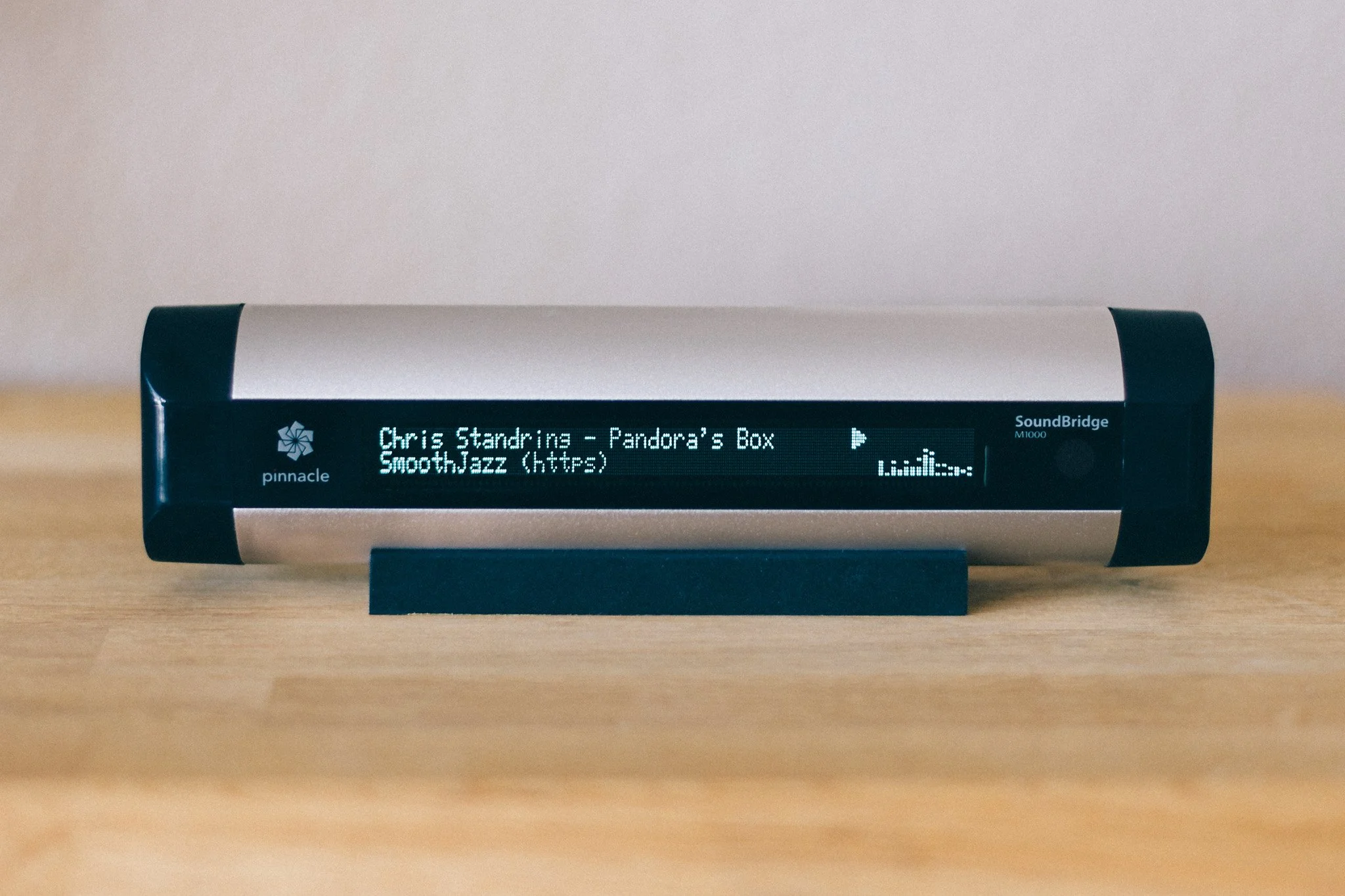

Roku SoundBridge – Saving a timeless network music player by Andrew B. Powers

Roku SoundBridge M1000 M1001

Still in use.

There are some devices that, even many years after their introduction, still make you wonder why nothing comparable is available anymore. For me, the Roku SoundBridge is definitely one of them!

I use the SoundBridge as a network music player connected to my stereo system. The device comes from a time when networked music was still something rather special, and streaming services as we know them today were still far from being part of everyday life. And yet, the basic concept behind the SoundBridge still feels surprisingly modern.

What I particularly like, especially compared with many modern streaming devices, is this clear separation of functions. The SoundBridge does not try to be a television, voice assistant, smart home hub, and cloud terminal all at once. It is a network music player. And that is precisely what makes it so interesting even today.

Ahead of its time.

With the SoundBridge, Roku had created a device that was remarkably well designed, both technically and conceptually, for its time. The first generation consisted of three models: the M500, M1000, and M2000. The three models were closely related technically and differed primarily in the type and size of their displays, as well as in their respective enclosure sizes.

The M500 did not have a graphics-capable VFD display and was therefore the simpler version. The M1000, by contrast, featured a large, graphics-capable VFD display that was remarkably impressive for a network music player of its era. The M2000 was larger still and correspondingly more expensive, but offered a display that remained easy to read even from a greater distance.

And that excellent display is, for me, still an essential part of the SoundBridge's character. While many modern streaming devices display information primarily through a smartphone app, the SoundBridge itself can show the currently playing track, the artist, or the selected source. It feels like a genuine standalone Hi-Fi component rather than a small network adapter whose actual user interface happens to live on a smartphone.

The first generation has, of course, long since become a piece of technology history. Even back then, the models were gradually replaced by the second generation. Today, M500, M1000, and M2000 units can generally only be found used, with the occasional old remaining stock turning up here and there.

The second generation included the M1001 as the successor to the M1000. Interestingly, Roku initially marketed the M1001 in some cases under the M1000 name as well, even though there are genuine differences between the two devices. They look very similar from the outside, but the M1001 has a somewhat different set of connections, with the connectors conveniently located on the rear panel.

The SoundBridge was also manufactured under license by Pinnacle for a time, particularly for markets outside North America. The Roku and Pinnacle units were essentially identical, although there was one important difference when it came to support for Apple's DAAP protocol: Pinnacle did not have a DAAP license from Apple. As a result, a Pinnacle SoundBridge could not directly access Apple iTunes shares or other DAAP servers. For iTunes users, however, Firefly provided a very good alternative server solution that was useful for more than just this particular purpose.

First & second generation - technically different.

The differences between the first and second generations were not limited to the enclosure, connectors, and features. The second-generation SoundBridge models, including the M1001, were based on a different audio architecture than the first-generation M500, M1000, and M2000.

The first generation in particular was appreciated by more demanding listeners for its audio quality. It also offered features such as HDCD support and DTS passthrough that were no longer available in the same form on the later models. Some owners therefore considered the audio quality of the second generation to be less impressive. At the same time, the new audio architecture was one of the reasons Roku was able to offer the devices at a significantly lower price. For most users, however, the sound quality remained more than adequate.

The second generation brought other advantages in return. It had a larger flash ROM, and Wi-Fi was built in. Firmware 2.7 also added WPA support, while the first generation was limited to WEP for wireless networking. The second generation was therefore not simply a technically inferior version of the original devices, but rather a further development with a different focus: lower cost, more modern networking capabilities, and a broader target audience.

Hardware - focused on the essentials.

Another thing I like about the SoundBridge is its remarkably straightforward and purposeful design. The device was not overloaded with as many features as possible, but instead focused on its actual purpose: receiving music over the network, processing it, and delivering it in good quality to a stereo system.

For music playback itself, the SoundBridge does not need a hard drive, an optical drive, or a fan. There are no mechanical components that have to be constantly moving during normal playback.

The SoundBridge connects to a music server or other source over a TCP/IP network. It processes the data and then outputs the music through its various audio connections. Depending on the model, this could be done via Ethernet or Wi-Fi. On the classic M-series models, the connection to the stereo system could then be made either via analog RCA or digitally through an optical or coaxial output, making the SoundBridge particularly interesting for a high-quality Hi-Fi setup. The analog output was also quite good. Personally, I have always found the overall sound quality excellent, and in comparison with older CD players connected via analog outputs, the SoundBridge actually sounded better to my ears.

Of course, this straightforward design does not mean that a device more than twenty years old is automatically free from age-related issues. Electronic components age, power supplies can eventually develop problems, and even a VFD display will not remain as bright and contrast-rich as it was on the first day. The underlying concept, however, is remarkably durable. The SoundBridge was not built around a short-lived online platform, but as a standalone network music player.

That technical simplicity is also part of its appeal for me. Essentially, it needs power, a network connection, and a connection to the audio system. For a device whose sole purpose is to play music, that is actually a remarkably well-defined job description.

soundbridge m1001 audio cabinet beastie boy books vintage receiver mid century house powerssowi soundbridge wizard

SoundBridge & Internet Radio

With later firmware versions, the SoundBridge also became particularly interesting as an Internet radio player. Starting with firmware 3.0, Roku integrated an online database containing a large number of radio stations, allowing users to search for stations and select them directly on the device. At the time, this was an exceptionally convenient solution.

There was no need to search for a stream on a computer, copy its address, and then somehow transfer it to the stereo system. The SoundBridge could search for radio stations itself and play the selected station directly.

The station database, however, was also a service external to the hardware itself. If the RadioRoku server was unavailable, new radio stations could not be selected through the database. Stations that had already been saved remained available, however. The SoundBridge provides 18 presets, allowing radio stations to be stored directly on the device and recalled even when the online database was unavailable.

At the time, this was an extremely practical solution. It also illustrates a problem that only became apparent years later with many devices from this generation: hardware can remain functional for far longer than the services it was originally designed to depend on.

Limitations in today's world.

Of course, by today's standards the SoundBridge is no longer a modern streaming device. It does not support the wide range of current streaming services that people expect from today's products, and its firmware has not received any major development for many years.

Modern HTTPS streams - big problem!

When the SoundBridge was developed, the technical requirements for Internet streaming were considerably simpler. HTTP-based audio streams were widespread, and communication between client and server was correspondingly straightforward.

Today, the situation is different. HTTPS has long since become the standard, and modern streaming servers use TLS encryption, current certificates, and protocols that network software from that era does not necessarily support.

For a modern computer, this is usually not a problem. Browsers and operating systems take care of certificates, encryption, and the latest protocol versions. Smartphones and modern streaming devices are also regularly updated and can therefore adapt to changes on the server side.

A SoundBridge naturally does not have the same ability to adapt. Its firmware comes from a different technological era and has not been updated for a long time to reflect the continued evolution of the Internet. The SoundBridge supports a surprisingly broad range of networking technologies for a device of its age, including WEP, WPA, AutoIP, DHCP, TCP, Telnet, HTTP and DRM. What it does not support, however, is HTTPS.

That missing HTTPS support is particularly significant today. The SoundBridge can communicate perfectly well over a TCP/IP network and can establish HTTP connections to streaming servers, but it cannot itself establish the modern TLS-encrypted HTTPS connections that have become standard on the Internet.

The last firmware updates were essentially limited to smaller fixes and adjustments, for example when changes were made to other services or protocols. There was therefore no later firmware development that could bring the SoundBridge's networking capabilities in line with the modern HTTPS-based Internet.

As a result, a stream can work perfectly well on a modern computer and still fail to play directly on the SoundBridge. The SoundBridge itself is not necessarily the problem. It can still reproduce audio extremely well, and it can still establish network connections. The difficulty arises where the capabilities of an older client meet the requirements of a modern streaming server.

At some point, that left me with an obvious question: Could this problem be solved without modifying the SoundBridge itself?

The solution - a proxy server.

The answer was surprisingly simple: the SoundBridge does not have to establish the modern HTTPS connection itself.

If a small server on the local network handles the connection to the Internet radio station, that server can take care of the technical requirements of the modern streaming server. It can then provide the SoundBridge with a stream that it can process using its existing capabilities.

This does not modernize the SoundBridge itself. Instead, it simply adapts the connection between the old hardware and the modern Internet.

For this purpose, NGINX was a natural choice. NGINX is a powerful web server and reverse proxy that is well suited to establishing a connection to a remote server and forwarding the resulting data stream to another client.

The basic setup is quite simple. The SoundBridge connects to a local HTTP address. NGINX accepts that connection and establishes an HTTPS connection to the actual radio station in the background. The incoming audio stream is then forwarded to the SoundBridge without unnecessary buffering.

In this way, the SoundBridge can continue to work with its existing network protocols, while NGINX handles the modern HTTPS connection to the radio station in the background.

First working solution.

Once the basic idea for the proxy had been established, the next step was to turn it into a working solution. I therefore decided not to install NGINX directly on the host system, but to run it inside a Docker container. NGINX does not require a complex environment and can be operated completely separately from the actual system installation. The required configuration, ports, and runtime environment of the proxy are therefore contained within a clearly isolated container. If the configuration needs to be changed later, or the proxy needs to be rebuilt completely, the underlying system remains largely unaffected.

Another advantage is easy reproducibility. The NGINX configuration can be managed independently of the underlying operating system. The container can be stopped, restarted, or recreated whenever necessary, without having to manually reinstall and configure NGINX on the host each time.

For managing the container, I used Portainer. Its graphical interface is extremely convenient, although Portainer is by no means required - Docker can of course be managed entirely from the command line. For a small home server, however, having a graphical interface makes administration considerably more convenient.

The actual NGINX configuration for this first solution consisted of two files. The first file defined the basic NGINX environment and specified, among other things, where logs were stored, which network parameters were used, and that additional server configurations should be loaded from:

/etc/nginx/conf.d/

The second file then defined the actual HTTP server. NGINX listened on port 80 and therefore provided a standard HTTP endpoint for the SoundBridge within the local network. The crucial part of the configuration was the address structure:

/soundbridge/URL

This allowed the SoundBridge, for example, to access a local address such as:

http://192.168.1.1:8777/soundbridge/...

NGINX received this request and used the part of the address following /soundbridge/ as the destination for its connection to the actual radio station.

The crucial difference compared with the SoundBridge itself was that NGINX could establish the connection to the destination server using HTTPS. The configuration therefore explicitly instructed NGINX to use HTTPS when connecting to the remote server. SNI was also enabled, and TLS 1.2 and TLS 1.3 were allowed for the connection to the remote server.

This created a clear separation between the two sides of the proxy. On one side, the old SoundBridge communicated with the local NGINX server using its existing network protocols. On the other side, NGINX established the modern HTTPS connection to the actual streaming server.

mid century space age palm springs shag soundbridge http https proxy server powerssowi soundbridge wizard

That separation was the key element of the entire solution. The SoundBridge therefore did not need to understand TLS or deal with the certificates used by the modern streaming server. From its perspective, the proxy was simply another network server on the local network. The modern encryption and all the associated requirements were handled entirely on the other side of the proxy.

Optimized for Streaming.

A normal web server does not necessarily have to be configured for maintaining a connection as a continuous data stream for hours at a time. For an Internet radio stream, however, that is exactly what is required. The server is not downloading a completed file. Instead, it continuously receives new audio data and immediately passes that data on to the client.

The NGINX configuration was therefore adjusted specifically for this purpose. Proxy buffering was disabled, as was caching. NGINX was not supposed to store the audio stream temporarily and then forward it in larger blocks. Instead, the incoming data should be passed to the SoundBridge as directly as possible.

The timeouts were also configured with longer intervals. A radio station does not terminate a connection simply because a complete file has not been transferred within a few seconds. The stream remains open and continuously delivers new audio data.

Various HTTP headers were also configured to improve compatibility with different streaming servers. These included a custom User-Agent and the forwarding of the Host header. NGINX was intended to identify itself clearly as an independent client to the radio station, while the SoundBridge continued to see a simple HTTP connection on the local side.

The configuration also included a simple health check. A separate local path could be used to verify whether the NGINX server itself was reachable. Although this was not necessary for audio playback, it made troubleshooting a running container considerably easier.

soundbridge m1001 vintage receiver mid century house powerssowi soundbridge wizar

Conclusion.

The result was a surprisingly simple solution to a problem that initially appeared to make the SoundBridge obsolete. Instead of replacing the player with a modern streaming device, I was able to keep the original hardware in use and adapt it to the technical requirements of today's Internet radio.

What makes the solution particularly appealing to me is that the SoundBridge itself remains completely untouched. Its original firmware, hardware, display, controls, and audio architecture can continue to be used exactly as they were designed.

In other words, rather than replacing a perfectly good piece of hardware simply because the Internet around it has changed, the solution adapts the connection between the old device and the modern Internet.

And that is ultimately what makes the SoundBridge worth saving.

Check out this new great solution for your SoundBridge too


If you have any questions, please drop me a message!